
We use our phones for almost everything—from communication and work to entertainment and shopping. Over time, they become filled with unused apps, duplicate photos, unnecessary files, and constant notifications that can make them feel slow and overwhelming. That’s where digital decluttering comes in.
Digital decluttering is the process of organizing your phone by removing digital clutter and keeping only what you truly need. A well-organized phone can help you save storage space, improve productivity, reduce distractions, and make everyday tasks easier. In this guide, you’ll learn what digital decluttering is, why it matters, how to declutter your phone step by step, and the simple habits that will help you keep it organized for the long term.
What Is Digital Decluttering?
Digital decluttering is the process of organizing and cleaning up the digital content on your devices, such as your smartphone, tablet, or computer. It involves removing unnecessary apps, deleting duplicate photos and old files, clearing unused downloads, organizing folders, and reducing digital distractions like excessive notifications.
Just as a messy room can make it harder to relax or find what you need, a cluttered phone can make everyday tasks feel more stressful. When your device is filled with unused apps, thousands of photos, unread emails, and constant notifications, it becomes easier to feel overwhelmed and distracted.
Learning how to declutter your phone isn’t about deleting everything or becoming a minimalist. Instead, it’s about keeping only what adds value to your daily life and organizing the rest in a way that makes your phone easier to use.
Digital decluttering also encourages healthier technology habits. By creating a cleaner digital space, you can spend less time searching for files, reduce unnecessary screen time, improve your focus, and enjoy a calmer, more organized mind.
Whether you’re starting with your phone, laptop, or inbox, taking small steps to remove digital clutter can make a noticeable difference in both your productivity and overall well-being.
A clean digital space can also improve your focus. Check out our guide on How to Stay Productive Without Feeling Overwhelmed for more practical productivity tips.
Why Decluttering Your Phone Is Important
Your phone is one of the most-used devices in your daily life. From checking emails and managing work to staying connected with family and friends, it stores a huge amount of information. Over time, however, it can become filled with unnecessary apps, duplicate photos, old files, and constant notifications. This is where digital decluttering becomes essential.
A cluttered phone can slow down your device, make it difficult to find important files, and leave you feeling overwhelmed every time you unlock your screen. Even something as simple as seeing dozens of unread notifications or hundreds of unused apps can create unnecessary mental distractions.
Practicing digital decluttering helps you create a cleaner, more organized digital space. When your phone is free from unnecessary clutter, you can spend less time searching for what you need and more time focusing on what truly matters.
Here are some of the biggest benefits of decluttering your phone:
Improves Productivity
A clean phone reduces distractions and makes it easier to stay focused. With fewer unnecessary apps and notifications competing for your attention, you can complete tasks more efficiently and avoid wasting time scrolling.
Reduces Stress and Mental Clutter
Digital clutter can feel just as overwhelming as a messy room. Organizing your phone creates a sense of control and helps reduce the mental load caused by constant digital distractions.
Frees Up Storage Space
Deleting duplicate photos, old videos, unused apps, and unnecessary downloads gives you more storage for the files and memories that actually matter. It can also improve your phone’s performance.
Makes Important Information Easier to Find
When your files, photos, notes, and apps are well organized, you spend less time searching and more time getting things done. Everything has its place, making your phone much easier to use.
Encourages Healthier Screen Habits
Digital decluttering isn’t just about cleaning your device—it also helps you rethink how you use technology. Removing distracting apps and turning off unnecessary notifications can reduce mindless screen time and encourage more intentional phone use.
Making phone organization a regular habit can improve both your digital life and your overall well-being. Even spending 10 to 15 minutes each week on digital decluttering can make your device feel faster, cleaner, and much less stressful to use.
Signs Your Phone Needs a Digital Declutter
Not sure whether it’s time for a digital decluttering session? Your phone often gives clear signs that it’s becoming overloaded with unnecessary files, apps, and distractions. If you notice any of the following, it’s probably time to organize your digital space.
Your Storage Is Almost Full
If you constantly receive “Storage Almost Full” notifications, your phone may be packed with old photos, videos, downloads, or apps you no longer use. Regular digital decluttering helps free up valuable storage space and keeps your device running more smoothly.
You Can’t Find Important Files or Apps
Do you spend several minutes searching for a document, photo, or app? A cluttered phone makes it difficult to locate what you need. Organizing your files into folders and removing unnecessary items can save you time every day.
You Have Too Many Unused Apps
Many of us download apps with good intentions but never use them again. If your home screen is filled with apps you haven’t opened in months, it’s a sign they are taking up storage and creating unnecessary clutter.
Your Photo Gallery Is Overwhelming
Thousands of screenshots, blurry pictures, duplicate images, and old videos can quickly make your gallery difficult to manage. Deleting unwanted media regularly helps you keep only the memories that matter.
Your Notification Bar Is Always Full
Constant notifications from shopping apps, games, social media, and promotional emails can become overwhelming. Turning off unnecessary notifications is an important part of digital decluttering because it reduces distractions and helps you focus.
Your Phone Feels Slow
A slow phone isn’t always caused by its age. Too many background apps, limited storage, and unnecessary files can affect performance. Removing digital clutter may help your device run faster and more efficiently.
Your Home Screen Feels Chaotic
If your apps are scattered across multiple screens without any organization, using your phone can feel frustrating. Grouping similar apps into folders and keeping only your most-used apps on the home screen makes navigation much easier.
You Feel Overwhelmed Every Time You Unlock Your Phone
Sometimes the biggest sign isn’t technical—it’s emotional. If opening your phone immediately makes you feel distracted, stressed, or mentally exhausted, it’s a strong indication that your digital environment needs attention. A little digital decluttering can make your phone feel calmer and more enjoyable to use.
Recognizing these signs early can help you take action before digital clutter becomes overwhelming. The good news is that most of these problems can be solved with a few simple organizing habits, which we’ll cover in the next section.
How to Declutter Your Phone
Digital decluttering doesn’t have to be difficult or time-consuming. You don’t need to organize your entire phone in one sitting. By taking small steps, you can remove unnecessary clutter, free up storage, and create a more organized digital space. Follow these simple tips to get started.
Delete Apps You No Longer Use
One of the easiest ways to begin digital decluttering is by deleting apps you no longer use. Many of us download apps for a specific purpose and then forget about them. These unused apps take up storage space, slow down your phone, and often send unnecessary notifications.
Go through your app list and uninstall anything you haven’t used in the last few months. If you ever need an app again, you can always reinstall it later.
Organize Your Home Screen
A messy home screen can make your phone feel overwhelming. Keep only the apps you use every day on the first page and group similar apps into folders such as Social Media, Shopping, Finance, Health, and Productivity.
A clean home screen helps you find apps faster and reduces unnecessary distractions throughout the day.
Clear Old Photos and Videos
Photos, videos, screenshots, and duplicate images often take up the most storage on your phone. Take some time to review your gallery and delete blurry photos, duplicate pictures, old screenshots, and videos you no longer need.
Before deleting important memories, back them up using a cloud storage service or an external hard drive. This simple digital decluttering habit can free up a significant amount of storage space.
Clean Your Downloads Folder
The Downloads folder is one of the most forgotten places on a phone. It often contains PDFs, documents, images, installation files, and other items that are no longer useful.
Open your Downloads folder and delete anything you don’t need. Regularly cleaning this folder is an easy part of digital decluttering that helps keep your storage organize.
Unsubscribe from Unwanted Emails
A cluttered inbox can make it difficult to find important emails. Unsubscribe from newsletters, promotional emails, and marketing messages that you never read.
Keeping your inbox organized saves time and reduces digital distractions. Most email providers include an Unsubscribe option at the bottom of promotional emails, making the process quick and easy.
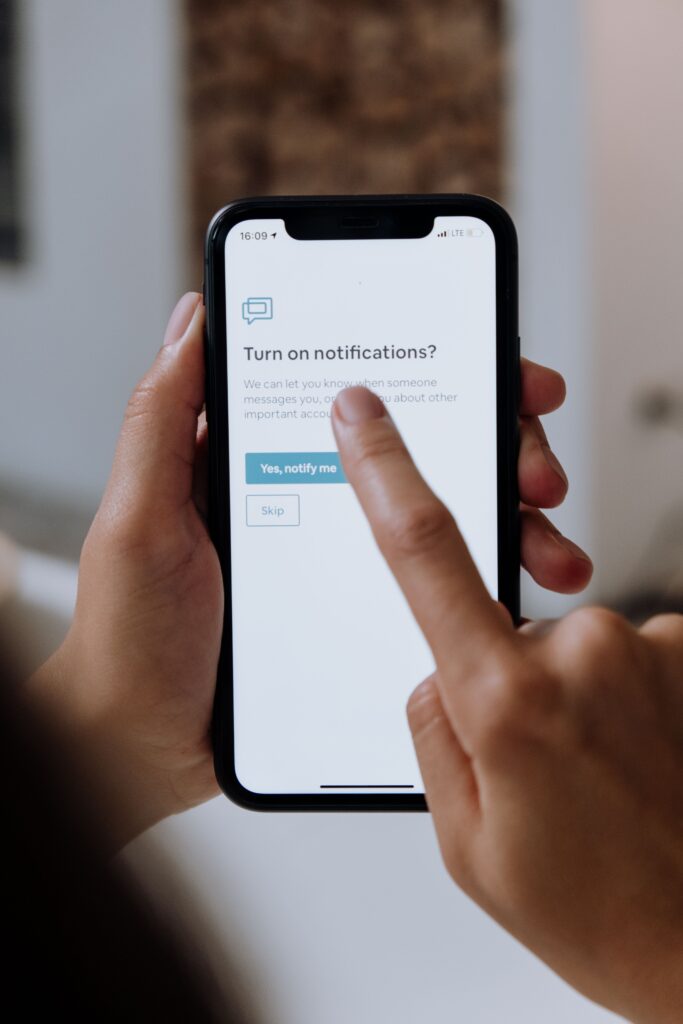
Turn Off Unnecessary Notifications
Constant notifications interrupt your focus and encourage you to check your phone more often than necessary. Review your notification settings and disable alerts from apps that aren’t essential, such as shopping apps, games, or social media platforms.
Only allow notifications from apps that are genuinely important, such as messaging, banking, or calendar apps. This simple change makes digital decluttering even more effective by reducing distractions.
Remove Duplicate Contacts
Duplicate contacts can make your contact list confusing and harder to manage. Spend a few minutes merging duplicate entries and deleting contacts you no longer need.
Keeping your contacts organized saves time when you’re searching for someone’s information and helps maintain a cleaner phone.
Organize Your Files
If you regularly save documents, receipts, travel tickets, or work files on your phone, create folders to organize them. Use clear folder names so you can quickly find important files whenever you need them.
An organized file system is an important part of digital decluttering because it prevents important documents from getting lost among unnecessary files.
Image Idea: Example of a neatly organized file manager with labeled folders.
Make Digital Decluttering a Monthly Habit
Digital clutter builds up over time, so don’t wait until your phone becomes completely disorganized. Set aside just 10 to 15 minutes every month to delete unused apps, clear old photos, organize files, and review your notifications.
Making digital decluttering a regular habit will keep your phone running smoothly, free up storage, and help you enjoy a cleaner and less stressful digital life.
Benefits of Keeping Your Phone Organized
Digital decluttering isn’t just about making your phone look neat. It also improves your daily life by helping you stay productive, save time, and reduce unnecessary stress. When your phone is well organized, it’s easier to focus on what matters instead of getting distracted by digital clutter. Here are some of the biggest benefits of keeping your phone organized.
Helps You Find Things Faster
A cluttered phone makes it difficult to locate apps, files, photos, or important documents when you need them. By organizing your apps into folders and keeping your files in the right place, you can quickly find what you’re looking for without wasting time.
Digital decluttering creates a more efficient phone that works for you instead of against you.
Frees Up Valuable Storage Space
Unused apps, duplicate photos, old downloads, and unnecessary files can take up a surprising amount of storage. Regular digital decluttering removes this unwanted data and gives you more room for new apps, photos, videos, and important documents.
With more available storage, your phone is less likely to display annoying “Storage Full” notifications.
Improves Your Phone’s Performance
When your phone has less unnecessary data to manage, it often performs better. Removing unused apps and clearing storage can help your device run more smoothly, reduce lag, and improve overall performance.
While digital decluttering won’t turn an old phone into a new one, it can help your device work more efficiently.
Reduces Stress and Digital Overwhelm
Seeing hundreds of unread emails, endless notifications, and a messy home screen can feel mentally exhausting. Digital decluttering creates a calmer digital environment, making your phone feel less overwhelming.
A clean phone can help you stay focused and reduce the mental clutter that often comes with constant digital distractions.
Saves Time Every Day
Even spending a few extra seconds searching for an app or file adds up over time. An organized phone helps you complete everyday tasks more quickly because everything has its proper place.
Whether you’re looking for a document, opening your banking app, or finding a contact, digital decluttering makes daily phone use much more efficient.
Helps You Stay More Productive
A clutter-free phone makes it easier to focus on work, studies, or personal goals. With fewer distractions from unnecessary apps and notifications, you’re less likely to lose time scrolling through social media or switching between apps.
Digital decluttering supports better productivity by helping you use your phone with more intention.
Protects Important Files
Keeping your files, photos, and documents organized reduces the chances of accidentally deleting or losing something important. Regularly reviewing and organizing your data also reminds you to back up valuable information.
This simple habit gives you greater peace of mind while keeping your digital life organized.
Encourages Healthier Phone Habits
One of the biggest long-term benefits of digital decluttering is that it encourages you to use your phone more intentionally. Instead of opening your device out of habit, you’ll be more likely to use it for meaningful tasks and spend less time on unnecessary distractions.
Over time, these small habits can improve your focus, productivity, and overall digital well-being.
Common Digital Decluttering Mistakes to Avoid
Digital decluttering can make your phone faster, more organized, and less distracting. However, many people make simple mistakes that either slow down the process or create new problems later.
Avoid these common mistakes to get the best results from your digital decluttering efforts.
Trying to Clean Everything at Once
One of the biggest mistakes is attempting to organize your entire phone in one sitting. This can quickly become overwhelming and may cause you to give up before you’re finished.
Instead, break digital decluttering into smaller tasks. For example, organize your apps one day, clean your photo gallery the next, and sort your files later. Small, consistent steps are much easier to maintain.
Deleting Important Files Without a Backup
Before removing photos, videos, documents, or contacts, make sure you have a backup. Accidentally deleting valuable memories or important files can be frustrating and sometimes impossible to recover.
Always back up important data to cloud storage or an external drive before starting your digital decluttering session.
Ignoring Notifications
Many people delete unused apps but forget about notifications from the apps they keep. Constant alerts can make your phone feel just as cluttered as a messy home screen.
Take a few minutes to review your notification settings and turn off alerts that aren’t necessary. This is an important part of successful digital decluttering.
Keeping Apps “Just in Case”
It’s common to keep apps because you think you might need them someday. In reality, many of these apps remain unused for months or even years.
If an app isn’t important and can easily be downloaded again, don’t be afraid to remove it. Keeping only the apps you actually use makes your phone cleaner and easier to navigate.
Forgetting to Organize New Files
Digital decluttering isn’t a one-time task. If you continue downloading files, saving screenshots, and installing new apps without organizing them, the clutter will quickly return.
Create a habit of putting new files into the correct folders and deleting unnecessary items as they appear.
Skipping Regular Maintenance
Many people spend hours cleaning their phones once and then never do it again. Over time, digital clutter builds up, leaving you back where you started.
Schedule a quick digital decluttering session once a month. Spending just 10 to 15 minutes deleting unnecessary files and reviewing your apps can keep your phone organized all year long.
Focusing Only on Storage Space
While freeing up storage is one benefit of digital decluttering, it isn’t the only goal. A truly organized phone also has a clean home screen, fewer distractions, an organized inbox, and well-managed notifications.
Think of digital decluttering as improving your overall digital experience, not just creating extra storage.
Not Creating a Simple Organization System
Deleting clutter is only half the job. Without a simple system for organizing apps, photos, and files, your phone can become messy again very quickly.
Use folders with clear names, keep your most-used apps on your home screen, and regularly organize new files. A simple system makes digital decluttering easier to maintain over time.
Final Thoughts
Digital decluttering is a simple habit that can make a big difference in your daily life. By regularly organizing your phone, deleting unnecessary files, and reducing digital distractions, you can save time, improve productivity, and enjoy a cleaner digital space. Start with small steps, stay consistent, and make digital decluttering a monthly habit to keep your phone organized and stress-free.